


Toyota
4.722.44K Reviews
App Specs
- Version
- 3.6.0
- Updated On
- License
- Free
- Downloads
- 5,000,000+
- Developer
- Toyota Motor North America, Inc.
- Categories
- Auto & Vehicles
- Platform
- Android, iOS
Screenshots
 Analysis by AppCompare
I tend to judge a connected-car app by what happens when I need it in a hurry, not by how many buttons it puts on a screen. Toyota’s app is meant for people managing a Toyota from a phone, and its usefulness depends on the vehicle, the service available for it, and a working connection. That makes it most appealing to owners who want a convenient companion for everyday car tasks rather than another general-purpose driving app.
When a connection matters
Remote actions and vehicle information are the moments when connectivity matters most. A request to check or change something about the car has to travel between the phone and the vehicle, so I would treat the app as a convenience, not as a substitute for the key, the dashboard, or a direct check of the car. If a command takes longer than expected, repeatedly tapping it is unlikely to make the experience clearer; I’d pause, check the vehicle in person when practical, and try again after the connection has settled.
That distinction is useful in daily planning. I might use a connected feature before leaving home, when there is time to confirm the result, but I would not build a tight schedule around a remote command completing at the last second. An app can reduce a small bit of friction, yet the physical car remains the dependable fallback. For anything safety-critical, I would follow the vehicle’s own controls and instructions rather than rely on a phone screen.
Built around the Toyota you drive
This is not a universal car-management tool: compatibility is tied to Toyota vehicles, and model year matters. The app supports 2010 or newer vehicles, with a newer cutoff for Hawaii, where support is for 2018 or newer vehicles. That is worth checking before making the app part of your routine, especially if you are buying a used Toyota or helping a family member with an older one. A phone app being available does not mean every function will fit every vehicle.
For a household with more than one driver, the practical question is not simply whether someone can install it, but whether the vehicle and the account setup suit the way that household shares the car. I would sort that out before relying on the app for handoffs or errands. If the Toyota is outside the supported age range, a general navigation app can still help with routes, and the vehicle’s own controls remain the straightforward choice for operating it.
A realistic day with the app
Picture a cold morning when I am getting ready for work and want to make the car more comfortable before walking outside. A remote-start option can make that routine easier, provided the particular vehicle supports it and the request goes through. I would send the command with a little time to spare, then check that it worked instead of assuming the car is ready simply because I tapped the screen. That small habit keeps a useful convenience from turning into a rushed guess.
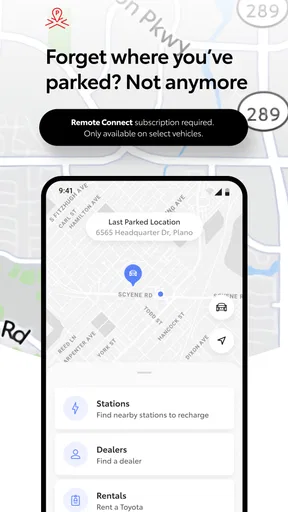
Later, after parking at a busy shopping centre, the locator can help me remember where the Toyota is. I would still take note of the parking level or nearby landmark when I leave the car: a location marker is a useful clue, not a replacement for paying attention to signs or the actual surroundings. The same practical approach applies to maintenance reminders. They can prompt me to look into upcoming service, while the vehicle’s manual and a service professional are better sources for deciding what work is actually due.
Worth Reading Before You Choose

EA SPORTS FC Mobile 26 Is a Bigger Football Game, but It Takes Time

Flipboard Shows What News Apps Must Do Beyond the Feed

Switching to Android Auto Means Rethinking Your Driving Routine

Google Calendar Makes a Crowded Week Easier to Manage

Ludo King Makes the Most of the Minutes Between Plans

Baby Panda World Brings Quick Play to Modern Phones, but Its Game Library Feels Busy
Where it fits among car apps
Compared with a standard map or parking app, Toyota’s app is aimed at the owner-and-vehicle relationship rather than helping every driver navigate. A navigation app is usually the better tool for comparing routes or finding places; this one is more relevant when I want Toyota-related information or connected actions. That narrower focus is a strength if I own a compatible Toyota, but it also means it will not replace the broader tools I already use on the road.
It is also different from relying only on the key fob and the car’s instrument panel. The phone can make some checks and tasks easier to approach, while the traditional controls are immediate and do not require me to stop and troubleshoot an app. I see the best setup as using each for what it does well: the app for convenient connected access, the car and key for direct operation, and a dedicated navigation tool when the journey itself is the priority.
Before installing, I would check the supported vehicle-year guidance and consider what I actually want from the app. If I mainly need directions, a mapping app is a better fit. If I want a phone-based companion for a supported Toyota, the app has a clearer purpose. It is free and is listed for everyone, but those points do not remove the need to confirm that the vehicle itself is compatible.
So, I recently got my hands on the Toyota app, and I have to say, it's been quite an experience. If you're a Toyota owner or just curious about what this app can do, stick around, because I'm about to dive deep into all its features and quirks. Trust me, you’ll want to know all about it.
First Impressions
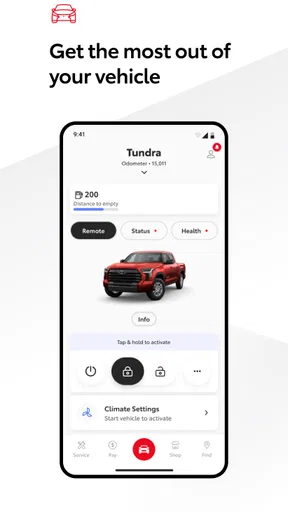
When I first opened the Toyota app, I was greeted with a clean and intuitive interface. It's like Toyota took a page out of the "keep it simple" playbook, and I’m here for it. Everything is laid out in a way that makes sense, even if you’re not exactly tech-savvy. The color scheme is easy on the eyes, and navigating through the app feels like a breeze.
Features That Stand Out
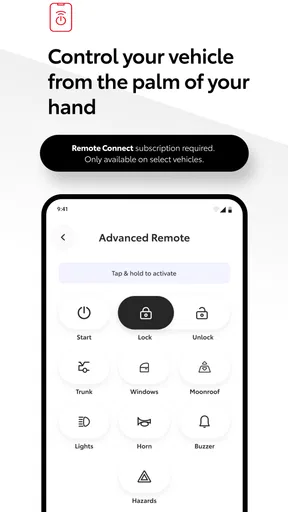
Okay, let's talk about features. One of the coolest things about this app is the remote start function. Imagine it's a chilly morning, and you don't want to leave the comfort of your bed to warm up your car. No worries, just a couple of taps, and your car is toasty warm by the time you step outside. It's a game-changer, folks.
Another handy feature is the vehicle locator. Ever lost your car in a crowded parking lot? Yeah, me too. With this app, you can say goodbye to that frustration. It pinpoints your car's location with impressive accuracy. Plus, there's the maintenance tracker, which is like having a personal assistant reminding you of all those pesky oil changes and tire rotations.
Connectivity and Performance
Connectivity is another area where this app shines. You can sync it with your smartwatch or voice assistant to make things even more seamless. Whether you’re on Android or iOS, the performance is smooth, with minimal lag. I did notice the occasional hiccup while loading certain features, but nothing that a quick update wouldn't fix.
"The app makes managing your car feel like a walk in the park."
Why You Might Love It
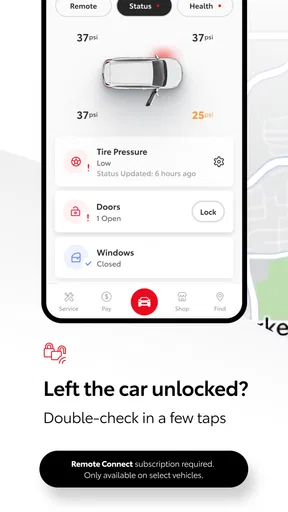
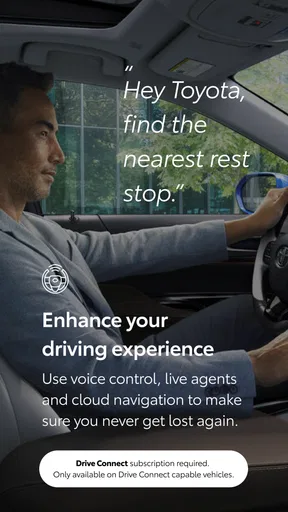
If you're someone who loves having control at your fingertips, this app is for you. It’s not just about convenience; it’s about enhancing your overall driving experience. The security features are also noteworthy. You can lock or unlock your car remotely, which is perfect for those "oops, did I lock the car?" moments.
Moreover, the app provides real-time data on fuel efficiency and mileage, helping you become more eco-conscious. It's like having a roadmap to better driving habits.
Everyday limits and sensible habits
One thing I would keep in mind is that a phone-based view can make vehicle information feel more immediate than it really is. I use fuel-efficiency figures and mileage as helpful context, not as a substitute for checking the car itself or keeping my own records when accuracy matters. A quick glance can answer a casual question; decisions about a long trip or service appointment deserve a closer look at the vehicle and its documentation.
Connectivity can also be less predictable in places with weak reception, such as underground parking or remote roads. That is a general limitation of connected tasks, and it is why I would not make the app my only way to access the car. If a screen fails to refresh, I would first check the phone’s connection and give the request a moment rather than assuming the vehicle has changed state. For locking or starting, confirming the result matters more than seeing a button respond.
For more data-conscious use, I would open the app when I have a clear task instead of leaving it as a constant source of notifications or checks. That keeps the phone experience focused and makes it easier to notice information that actually calls for action. I would also avoid treating every reminder as an urgent repair: maintenance prompts are useful nudges, but the right interval and work depend on the vehicle and its service guidance.
Who should make room for it?
I think it suits Toyota owners who enjoy having basic vehicle management close at hand, particularly people who regularly forget where they parked or appreciate a prompt to plan routine care. It can also be useful for someone who wants to check a connected function from indoors before heading out. Its value is less obvious for drivers who rarely use phone-based services, prefer not to manage accounts through apps, or mainly want navigation and traffic information.
The developer is Toyota Motor North America, Inc., which gives the app a clear manufacturer-specific role rather than the broad coverage of an independent automotive utility. It has an average rating of 4.5 from around 128,000 ratings, and more than a million installs. Those figures suggest plenty of interest, but I would still put vehicle compatibility and the features I personally need ahead of popularity. It is a free app, rated for everyone, and its release date is August 6, 2019; the minimum operating-system requirement is version 10.
If a feature does not appear or behave as expected, I would work through the basics in order: confirm the Toyota is within the supported model-year range, check the phone’s connection, close and reopen the app, and verify the result at the vehicle. If the issue persists, I would use Toyota’s support channels rather than repeatedly sending commands. That approach is especially sensible when an action affects access to the car, because the app’s screen alone is not proof that the vehicle completed it.
Final Thoughts
At the end of the day, the Toyota app does a fantastic job of integrating technology with everyday driving. While it might not be perfect, the pros certainly outweigh the cons. If you own a Toyota or are thinking about getting one, the app is definitely worth checking out. Who knew managing your car could feel this effortless?
My recommendation is to treat it as a useful companion, not as a must-have replacement for your key, dashboard, maintenance records, or navigation app. The strongest case for installing it is simple: you have a supported Toyota and will genuinely use its connected conveniences. If that describes you, it is worth trying; if you need a universal car tool or do not want phone-dependent interactions, the usual direct controls and specialist apps may suit you better.
Pros
- User-friendly interface for easy navigation.
- Comprehensive vehicle management features.
- Real-time updates on vehicle status.
- Seamless integration with smart devices.
- Highly responsive customer support.
Cons
- Limited functionality for non-Toyota vehicles.
- Some features require stable internet.
- Occasional glitches in remote start.
- User data requires manual updates.
- Limited customization options.
FAQs for Toyota
What features does the Toyota app offer?
The Toyota app provides a variety of features including remote start, lock/unlock, vehicle health reports, and service scheduling. Additionally, it offers real-time maintenance alerts and the ability to locate your vehicle using GPS. These features enhance the convenience and safety of your Toyota driving experience.
Is the Toyota app compatible with all Toyota models?
The app is compatible with most recent Toyota models, generally those manufactured from 2018 onwards. However, compatibility may vary based on specific features and your vehicle’s capabilities. It’s advisable to check the compatibility with your particular model before downloading the app.
Does the Toyota app require a subscription?
Yes, certain features of the Toyota app require a subscription. While basic functions may be available for free, premium services such as remote start or vehicle health monitoring often require a paid subscription. It’s best to review the app’s pricing details for the specific services you need.
How secure is the Toyota app?
The Toyota app employs advanced security measures to protect your data and ensure privacy. It uses encryption and requires a secure login process to access features. Regular updates also help maintain security standards. Users should ensure their app is always updated for the best protection.
Can I use the Toyota app without an internet connection?
Some functionalities, like accessing saved information or viewing previous reports, might be available offline. However, features that require real-time data, such as vehicle location or remote operations, need an active internet connection to function properly. For optimal use, ensure you're connected to the internet.


